Hotel Wi-Fi Security: A Complete Guide to Protecting the Guest Network and Hotel Systems
In short: what is hotel Wi-Fi security?
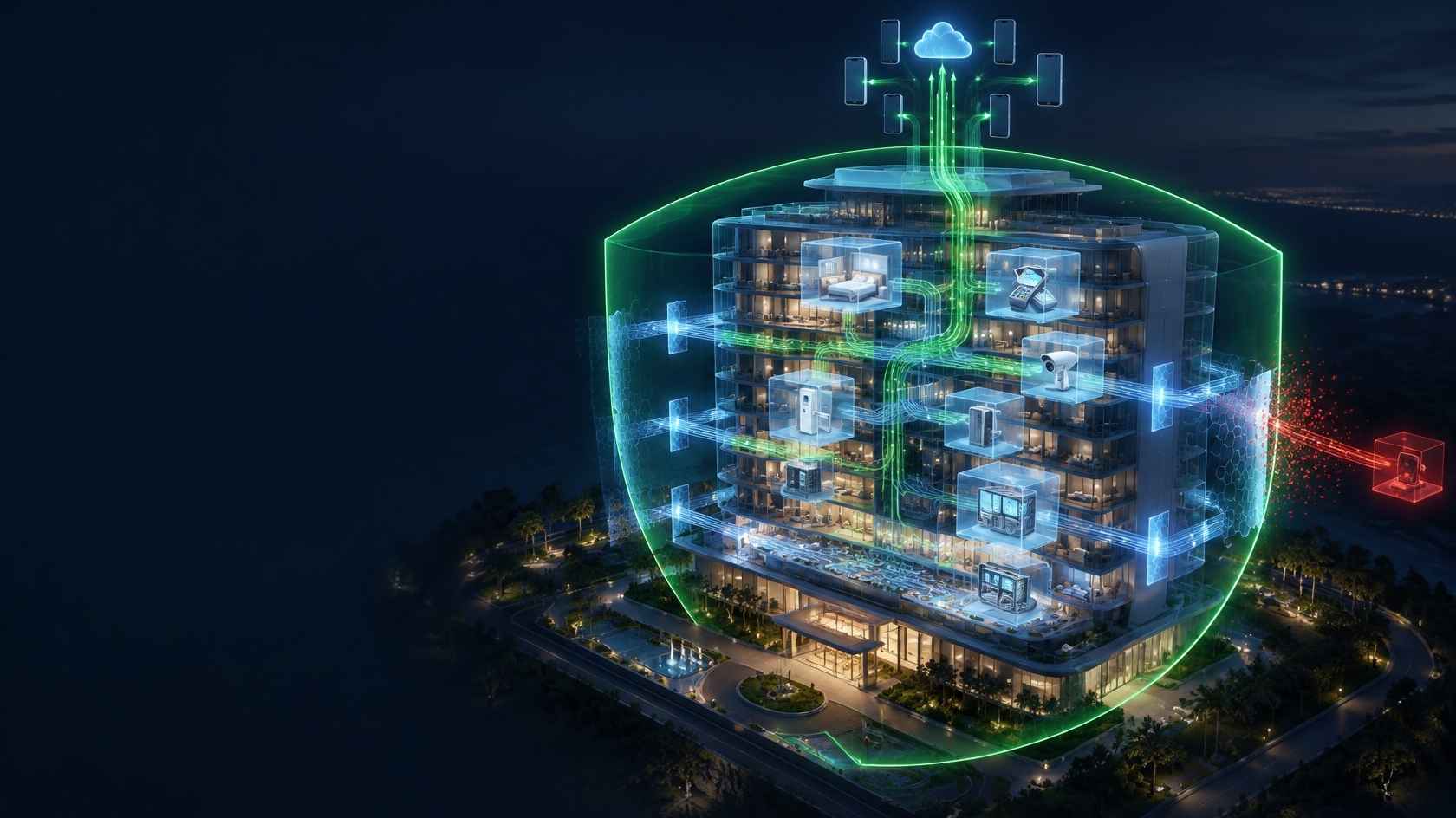
Hotel Wi-Fi security is a holistic approach that covers separating the wireless network used by guests from the hotel's critical systems such as reservations, accounting, POS, cameras and building automation; protecting guest devices from each other; closing network devices to unauthorised access; and detecting and responding quickly to potential security incidents. A strong Wi-Fi password is only a small part of this approach; real protection comes from network architecture, access control, up-to-date devices, monitoring and the right procedures.
Why are hotels attractive targets for cyber attackers?
Hotels have a distinctive risk profile in terms of cyber security. Hundreds of different people and devices join the network every day, and the security level of these devices is outside the hotel's control. At the same time, hotel systems hold valuable data such as guests' identity details, contact data, credit card transactions and stay history. Staff turnover is seasonally high, and the technical team is usually small and juggling several jobs at once.
Common risks in hotel networks include:
- Lateral movement: Reaching the hotel's internal systems from the guest network.
- Guest-to-guest attacks: A device on the same network scanning other guests' devices or trying to monitor their traffic.
- Rogue access points (evil twin): Tricking guests with a broadcast that imitates the hotel's network name.
- Default passwords: Factory passwords left unchanged on routers, switches, access points and camera recorders.
- Outdated software: Device firmware with known, unpatched vulnerabilities.
- Malware spreading: Malicious software reaching the network from an infected guest or staff device.
- Physical access: Open network sockets in the lobby or corridors, unlocked cabinets.
- Social engineering: People posing as technical support to obtain information or access from staff.
A layered security approach
Hotel Wi-Fi security cannot be achieved with a single measure. Each layer complements the previous one; even if one is breached, the others limit the damage.
1. Network segmentation: the most critical measure
Guest devices must never share the same trust zone as hotel systems. To achieve this, the network is divided into logical segments with VLANs:
- Guest network
- Staff network
- Property management system and servers
- POS and payment systems
- Camera and security systems
- Building automation, door locks and IoT devices
- Network management network
Firewall rules are defined between each VLAN. The guest network should only be able to reach the internet and no other network. The staff network should only reach the servers needed for work, and the POS network should be kept isolated with only the limited connections required by the payment infrastructure. The principle of "block by default, open what is needed" should be applied.
2. Client isolation
On the guest network, devices connected to the same access point or the same VLAN should be prevented from communicating directly with each other. This feature (client isolation / AP isolation) stops a guest from scanning other guests' devices, accessing their file shares or trying to monitor network traffic.
3. Wireless security settings
- On the staff network, methods that use personal credentials, such as WPA2-Enterprise or WPA3-Enterprise, should be preferred. This way, a departing employee's access can be revoked individually.
- On the guest network, an open network + captive portal is commonly used. Here, where supported, technologies such as OWE (Enhanced Open), which encrypt wireless traffic even on open networks, can be considered.
- Old and insecure encryption methods (WEP, TKIP) should be disabled.
- Management and staff SSIDs should be named so that guests cannot easily guess them.
4. Measures against rogue access points
A malicious person can broadcast a network with the same name as the hotel's and lure guests into connecting to their device. To reduce this risk:
- Use the wireless infrastructure's features for detecting rogue or unauthorised access points (rogue AP detection).
- Serve the captive portal over HTTPS with a valid certificate, so guests can verify they are on the right portal.
- State the hotel's official network name clearly on the portal and in room information.
5. Hardening network devices
- Default usernames and passwords should be changed or removed on all devices.
- Management interfaces (WinBox, SSH, web panel) should be accessible only from the management network and closed to the internet and the guest network.
- Unused services (telnet, FTP, old APIs) should be disabled.
- Device software (firmware, RouterOS, etc.) should be updated regularly, with a backup taken before updating.
- Unused switch ports should be shut down or assigned to the guest VLAN.
6. Protecting management access
- A separate account should be defined for each administrator; a shared "admin" account should not be used.
- Strong passwords and, wherever possible, multi-factor authentication (MFA) should be used.
- Role-based authorisation should be applied: for example, reception can see guest sessions but cannot change the network configuration.
- Remote access should be provided only via VPN.
- The access of departing staff and external service providers should be revoked immediately.
7. Monitoring, logging and alerts
Security incidents can only be handled when they are visible:
- Logs from network devices and the hotspot system should be collected centrally and kept with accurate time information.
- Unusual traffic spikes, large numbers of failed login attempts and activity on administrator accounts should be monitored.
- An alert mechanism via email or message should be set up for critical events.
- Access records should be stored securely and immutably for post-incident investigation.
8. Physical security
- Server rooms and network cabinets should be kept locked, with access recorded.
- Unused network sockets in the lobby, meeting rooms and corridors should be disabled.
- Access points and cameras should be mounted so that they cannot easily be removed.
9. Staff awareness
Technical measures can be undone by human error. Staff should be regularly informed about:
- Not giving passwords or access to people claiming to be technical support.
- Not plugging unknown USB sticks into hotel computers.
- Not clicking on links in suspicious emails.
- The correct procedure to follow when guests complain about Wi-Fi.
10. Incident response plan
What to do when a security incident occurs should be decided in advance:
- Who detects the incident and whom they report it to.
- How the affected device or network segment will be isolated.
- How logs will be preserved and prepared for investigation.
- If necessary, the notification process to the authorities and, under KVKK, to Turkey's Personal Data Protection Board.
- How systems will be safely brought back into service and lessons learned applied.
Where to start? A prioritised roadmap
Implementing every measure at once may not be possible for every hotel. For properties with limited resources, the following order of priority offers a practical start:
- First week: Change the default passwords on all network devices, close management interfaces to the internet and back up existing configurations.
- First month: Separate the guest network with a VLAN, block access from the guest network to internal systems with the firewall and enable client isolation. Move from a shared password to captive portal access.
- First three months: Update device software, personalise and authorise administrator accounts, move remote access to VPN and start collecting logs centrally.
- First six months: Move the POS and camera networks to separate VLANs, introduce rogue access point detection and alert mechanisms, and run staff awareness training.
- Ongoing: Put the incident response plan in writing, carry out a security assessment at least once a year and review the checklist again before every season.
This order brings forward the steps that deliver the greatest risk reduction at the lowest cost. The first two steps in particular are basic measures that can prevent a significant share of the incidents seen in hotel networks.
Special attention for POS and payment systems
POS terminals and the payment infrastructure where credit card transactions take place are the most sensitive components of a hotel network. These devices must be strictly isolated from the guest network and allowed to reach only the addresses required by the payment provider. Businesses processing card data need to take into account the security requirements of their payment providers and card schemes (for example PCI DSS). Guest Wi-Fi projects should be designed so that they do not conflict with these requirements.
Security tips for guests
The hotel can also contribute to its guests' security. Short tips can be included on the portal or in room information:
- Connect only to the hotel's official network name.
- Make sure you use an HTTPS connection for sensitive transactions such as banking.
- Turn off file sharing on your device.
- Keep your operating system and apps up to date.
Hotel Wi-Fi security checklist
- ✓Are the guest, staff, POS, camera, IoT and management networks on separate VLANs?
- ✓Can the guest network reach only the internet?
- ✓Is client isolation enabled?
- ✓Does the staff network use authentication with personal credentials?
- ✓Have default passwords been changed on all network devices?
- ✓Are management interfaces accessible only from the management network?
- ✓Is device software up to date, and are configuration backups being taken?
- ✓Do administrator accounts have MFA and role-based permissions?
- ✓Are logs kept centrally with accurate time information?
- ✓Is rogue access point detection in place?
- ✓Are server rooms and cabinets locked?
- ✓Is there an incident response plan with named responsibilities?
Common mistakes
- !Running guest Wi-Fi and the hotel office network on the same modem without any separation.
- !Leaving the camera recorder's management interface open to the internet.
- !Giving the technical support company permanent, unlimited remote access.
- !Not changing the staff Wi-Fi password for years.
- !Doing no monitoring at all to notice security incidents.
Frequently asked questions
Is a password-free guest Wi-Fi insecure?
An open guest network is a common and accepted approach when used together with controlled access via a captive portal, client isolation and network segmentation. A shared password does not provide a serious security layer on its own, because it is information that everyone knows.
Is a VLAN enough on its own?
No. VLANs separate networks logically, but the traffic between them must be controlled with firewall rules. A misconfigured router can allow traffic between VLANs.
Does a hotspot system make the hotel network secure?
A hotspot system controls guest access, identifies users, manages sessions and keeps access records. This is an important component of a secure architecture, but it must be implemented together with segmentation, device security and procedures.
How often should security checks be carried out?
Device updates and log reviews should be done regularly (for example monthly), and a comprehensive security assessment at least once a year and after major infrastructure changes. For tourism properties, a pre-season check is also recommended.
How can we secure our technical support company's remote access?
Instead of permanent, unlimited access for the external provider, use an access model that is opened only when needed, uses personal accounts and runs over VPN. Make sure the actions performed are logged, and change all access rights and shared passwords when the contract ends.
Should a small boutique hotel apply all these measures?
Even at a small scale the basic principles are the same: separate the guest network, change default passwords, keep devices up to date and protect management access. These measures can be implemented at low cost in small properties too.
Next step with Richspot
With authentication methods that ensure users log in securely, per-user session and bandwidth management, active session tracking from the management panel and automatic logging within the scope of Law No. 5651, Richspot Hotspot can be considered as a component of a secure guest access architecture. By positioning the product together with proper network segmentation, device security and business procedures, you can make your hotel's guest network both user-friendly and secure.
