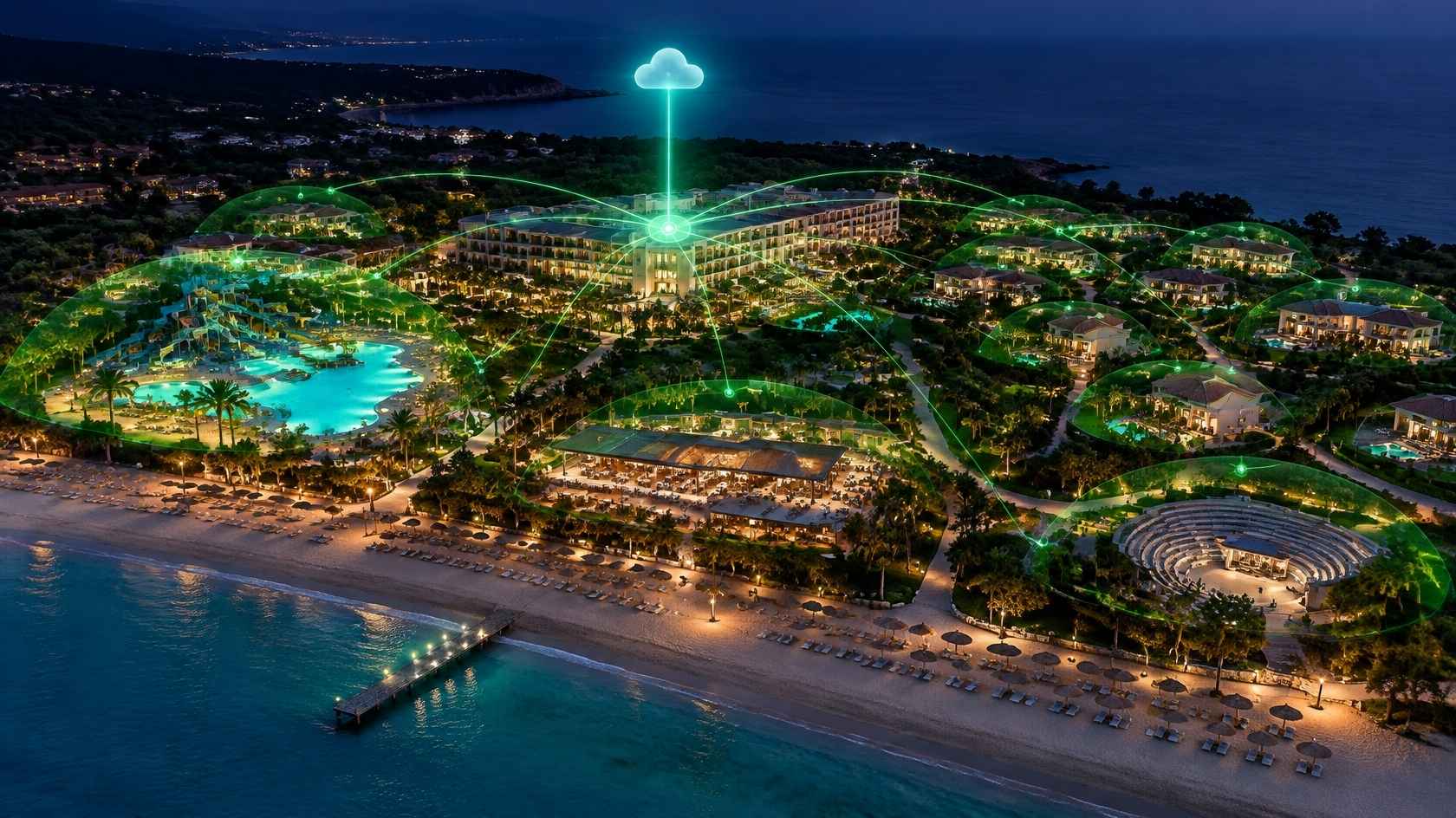
Central Wi-Fi Management in Resorts and Holiday Villages: Planning and Implementation Guide
In short: what is central Wi-Fi management in resorts?
Central Wi-Fi management in resorts and holiday villages means planning, operating and monitoring the entire wireless network of a large property — rooms, villas, restaurants, pools, beach, spa, conference centre and outdoor areas — through a single architecture and a single management panel. With this approach, guests connect with the same network name, the same login experience and the same speed policy wherever they are, while the business tracks user numbers, traffic density, access point status and access records centrally.
Why do resorts need a different Wi-Fi approach?
A city hotel usually consists of a single building, with similar floors, corridors and rooms. Resorts and holiday villages, by contrast, spread across many hectares and consist of areas with very different characters. The main building, villa blocks, family bungalows, buffet restaurant, à la carte restaurants, bars, pools, aquapark, beach, pier, spa, fitness centre, kids' club, amphitheatre, conference halls and staff accommodation may all be on the same property.
This variety creates some specific challenges:
- Distance and topography: Buildings may be hundreds of metres apart; trees, sloping terrain and structures block the signal.
- Outdoor conditions: Sun, rain, humidity, salty air and temperature swings affect equipment selection.
- Shifting density: The pool and beach are busy during the day, restaurants and the amphitheatre in the evening, and the rooms at night.
- Seasonality: In summer, occupancy and user numbers multiply; in winter, part of the property may be closed.
- Multilingual guest profile: Guests from different countries have different devices and usage habits.
- Many operational systems: POS, cameras, door locks, building automation, IPTV and staff devices share the same physical infrastructure.
Wi-Fi in resorts should therefore be treated not as "a few access points everywhere" but as a network project covering the entire property.
The key planning steps
1. Site survey and needs analysis
The first step is to examine all areas of the property with floor plans, the site plan and the existing infrastructure. For each area, the following questions should be answered:
- How many people can be in this area at the same time?
- What do guests use the internet for here (messaging, video, video calls, work)?
- Is the area indoors, outdoors or semi-open?
- What cabling, power and mounting options exist?
- Are there aesthetic constraints (for example, no visible devices on villa façades)?
2. Capacity calculation
In resorts, capacity planning can be even more critical than coverage. For example, a 600-room property at 95 percent occupancy, with an average of 2.5 guests per room and 2 devices per guest, may have to serve more than 2,800 devices. Not all of them will be active at the same time, but in the evening concurrent use can reach 40–60 percent. This estimate is the basic input for sizing the internet line, the gateway hardware, the backbone links and the number of access points in each area.
3. Coverage design
- Rooms and villas: Depending on wall structure, in-room, between-room or corridor-mounted access points should be planned. Villas and bungalows may need a separate access point for each unit.
- Pool and beach: Outdoor access points with high-gain or sector antennas should be used, mounted on poles, lighting columns or building façades with an appropriate protection rating.
- Restaurants and bars: In these areas, where many devices connect within a short time, high client-capacity access points and careful channel planning are needed.
- Conference and meeting rooms: A separate capacity calculation should be made for hundreds of participants during events.
- Transit areas: Walkways and gardens should be planned with minimum coverage so that guests' connections do not drop.
4. Backbone and link infrastructure
On large properties, buildings are usually connected with fibre optic cables. Where fibre cannot be laid, point-to-point wireless bridges can be used, but they must be carefully planned according to weather conditions, line of sight and capacity. Each building should have managed, PoE-capable switches, and the power needs of the access points should be compared with the switch PoE budget.
5. Internet uplink and redundancy
An internet outage in peak season affects the whole property. It is therefore recommended to take lines from at least two different providers and configure load balancing or failover. The gateway hardware should also be powerful enough for the user load and, at critical properties, a redundant setup should be considered.
Why central management is critical
Resorts have dozens or even hundreds of access points, several switches, gateways and different user groups. This complexity can only be controlled with a central management approach.
One network name, one experience
Guests should be able to connect by the pool, in the restaurant and on the beach with the same network name they use in their room. Using different network names or passwords in each area tires guests out and increases questions at reception. With central hotspot management, once guests are authenticated, their session continues as they move around the property.
User groups and policies
- Staying guests: Room number login, access for the length of stay, speed profile by room type.
- Day visitors: Time-limited access via SMS or voucher for beach club, spa or restaurant guests.
- Conference participants: Event-specific vouchers, room-specific capacity and speed profiles.
- Staff: A separate network and credentials, fully isolated from the guest network.
- Operational devices: Separate VLANs for POS, cameras, door locks and IoT devices, outside the hotspot and with their own security policies.
Central monitoring and reporting
The management panel shows the number of connected users in real time, density by area, traffic consumption, problematic access points and session records. This data is used both for immediate troubleshooting and for planning investments for the next season.
Example: an area-based density plan
In a 600-room holiday village, user movement throughout the day roughly looks like this:
- Morning (08:00–10:00): Density peaks in the buffet restaurant. Hundreds of guests use messaging and social media during breakfast; access points in the restaurant must be ready for a high number of clients.
- Daytime (10:00–17:00): The pool, aquapark and beach are the busiest areas. Use is mostly photo and video sharing, video calls and music streaming. The capacity of outdoor access points is tested during these hours.
- Evening (19:00–22:00): Restaurants, bars and the amphitheatre fill up. During shows there are short but very intense bursts of connection requests.
- Night (22:00–01:00): Most users return to their rooms; bandwidth consumption reaches its highest level because of video streaming and video calls.
This picture shows that capacity is not a fixed value. Hourly reports from the central management panel allow access point placement and internet line capacity to be validated with real usage data, so that investment is directed to the areas and times where it is needed most.
Roaming and seamless connectivity
As guests walk from their room to the pool and from there to the restaurant, their device moves from one access point to another. For this handover to be smooth:
- Access point coverage areas should overlap appropriately.
- All access points should broadcast the same SSID with the same security settings.
- Where supported, fast roaming standards (802.11k/v/r) should be considered.
- The hotspot session should be designed to continue without the device's IP address changing; managing the guest network in a single broadcast domain (VLAN) under a single gateway makes this easier.
- Access point transmit power should be set so that devices do not "stick" to a distant access point.
Security and network segmentation
In resorts, security becomes even more important because of the number of guests and the variety of systems:
- Guest, staff, POS, camera, building automation and management networks should be on separate VLANs.
- The guest VLAN should only reach the internet, with access to other networks blocked by the firewall.
- Client isolation should be enabled between guest devices.
- The management interfaces of network devices should be reachable only from the management network.
- Access records for all areas should be kept centrally with consistent time information.
Preparing for the season
For tourism properties, the biggest test of the Wi-Fi infrastructure is the peak weeks of the summer season. Before the season:
- Software updates and configuration backups of network devices should be completed.
- Devices in areas closed during winter should be tested.
- Reports from the previous season should be reviewed and additional access points planned for congested areas.
- Internet line capacity should be reviewed against expected occupancy.
- Load tests and pilot checks should be carried out.
- New seasonal staff should be trained on basic Wi-Fi guest questions and management panel tasks.
Common mistakes
- !Using indoor access points in beach and pool areas.
- !Connecting buildings with wireless bridges of insufficient capacity.
- !Using a separate network name and password for each area.
- !Calculating capacity based only on room count and forgetting common areas.
- !Running staff and operational devices on the guest network.
- !Not testing and updating before the season.
Resort Wi-Fi checklist
- ✓Has a capacity and coverage analysis been done for all areas of the property?
- ✓Are outdoor access points of an appropriate protection rating?
- ✓Is the backbone between buildings of sufficient capacity?
- ✓Is the internet uplink redundant?
- ✓Is there one network name and seamless roaming across the whole property?
- ✓Have staying guest, day visitor, conference and staff user groups been separated?
- ✓Are operational systems on separate VLANs?
- ✓Is central monitoring and reporting active?
- ✓Is a multilingual captive portal ready?
- ✓Has a pre-season load test been carried out?
Frequently asked questions
How many access points does a resort need?
The exact number depends on area size, building materials, user density and equipment specifications. The right number can only be determined through a site survey and capacity analysis.
Does offering Wi-Fi on the beach make sense?
Guest expectations are increasingly moving in this direction. With the right equipment and mounting, stable connectivity can also be provided on the beach and pier, but a maintenance and protection plan is needed because of outdoor conditions.
Should day visitors get Wi-Fi as well?
That is the business's choice. If it is offered, it is recommended to place them in a separate user group from staying guests, with SMS or voucher authentication and time and speed limits.
Cloud or on-premises for central management?
Cloud-based management offers remote access, multi-property management and easy updates. An on-premises installation may be preferred for certain data and continuity requirements. The decision should be based on the property's infrastructure and corporate policies.
Do guests have to log in again in every building on a multi-building property?
Not with a correctly designed central hotspot setup. When the guest network is under a single management, once a guest is authenticated their session continues across the whole property.
Next step with Richspot
With features such as stable performance under high user density, compatibility with multiple modems and access points, a room-based password system, authorisation based on check-in/check-out times, a multilingual captive portal and cloud-based central management, Richspot Hotspot can be considered for the central management of guest access in resorts and holiday villages. Whether you have a single property or many locations, all hotspot points can be managed from one centre.
Talk to the Richspot team about a network survey, coverage plan and the right package scope for your property.
